> For the complete documentation index, see [llms.txt](https://cover-docs.diffblue.com/llms.txt). Markdown versions of documentation pages are available by appending `.md` to page URLs; this page is available as [Markdown](https://cover-docs.diffblue.com/features/cover-cli/project-configuration/spring-profiles.md).
# Spring profiles
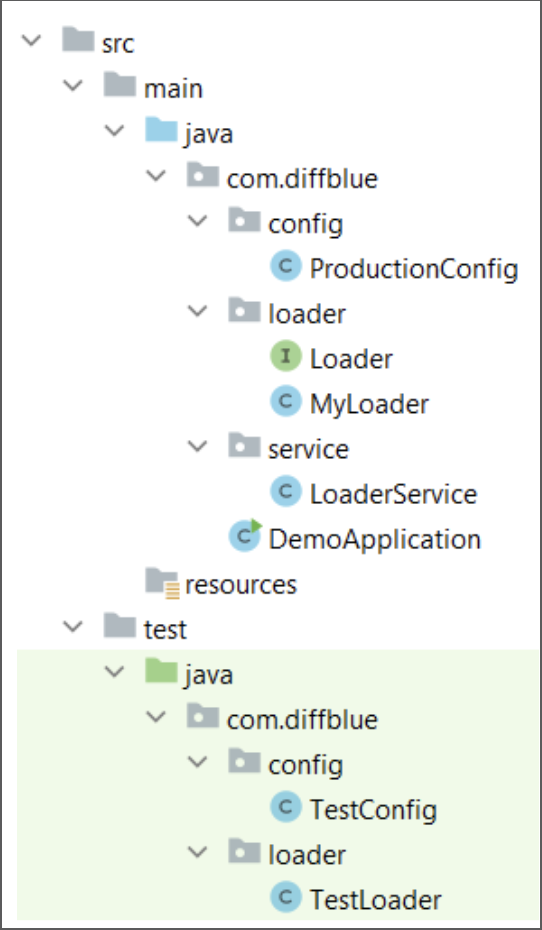
As Java projects pass from development into production it is sometimes necessary to use different suites of project dependencies and settings, loaded as a profile. In a typical Spring project this can be achieved following a project structure such as:
A class `service.LoaderService`
```groovy
package com.diffblue.service;
import com.diffblue.loader.Loader;
import org.springframework.beans.factory.annotation.Autowired;
import org.springframework.stereotype.Service;
// Simple service implementation
@Service
public class LoaderService {
private final Loader loader;
@Autowired
public LoaderService(Loader loader) {
this.loader = loader;
}
public String getMessage() {
return "service + " + loader.getMessage();
}
}
```
has an instance of an interface `loader.Loader`.
```groovy
package com.diffblue.loader;
// Example interface.
public interface Loader {
String getMessage();
}
```
Another class `loader.MyLoader` implements that interface,
```groovy
package com.diffblue.loader;
/**
* Simple implementation of a loader.
*/
public class MyLoader implements Loader {
private final String message;
public MyLoader(String message) {
this.message = message;
}
public String getMessage() {
return message;
}
}
```
which is used to supply the `loader.Loader` interface.
This is done in a class `config.ProductionConfig` where the user has the possibility to configure the loader by using the `@Configuration` and `@Profile()` annotations:
```groovy
package com.diffblue.config;
import com.diffblue.loader.Loader;
import com.diffblue.loader.MyLoader;
import org.springframework.context.annotation.Bean;
import org.springframework.context.annotation.Configuration;
import org.springframework.context.annotation.Profile;
/**
* Load a "production" loader when we're not
* using the test-scenario profile.
*/
@Configuration
@Profile("!test-scenario")
public class ProductionConfig {
@Bean
public Loader getLoader() {
return new MyLoader("production");
}
}
```
The class `config.ProductionConfig` should be annotated with `@Profile("!test-scenario")` in production mode:
When using IntelliJ, the Spring profile in use must be declared in **Run > Edit Configurations > VM Options**:
In development mode, the annotation `@Profile("test-scenario")`, should be used in a class `config.TestConfig` placed in the test directory:
```groovy
package com.diffblue.config;
import com.diffblue.loader.Loader;
import com.diffblue.loader.MyLoader;
import org.springframework.context.annotation.Bean;
import org.springframework.context.annotation.ComponentScan;
import org.springframework.context.annotation.Configuration;
import org.springframework.context.annotation.Profile;
/**
* Load a "test" loader when we are using the test-scenario profile.
*/
@Configuration
@ComponentScan
@Profile("test-scenario")
public class TestConfig {
@Bean
public Loader getLoader() {
return new MyLoader("test");
}
}
```
which configures a test loader through the **loader.TestLoader** also placed in the test directory
```groovy
package com.diffblue.loader;
import org.springframework.context.annotation.Profile;
/**
* Simple implementation of a loader.
*/
@Profile("test-scenario")
public class TestLoader implements Loader {
private final String message = "static-test-loader";
public String getMessage() {
return message;
}
}
```
These two classes are placed in the test directory in order to be isolated from a run in the production mode.
To use a specific profile in development mode, the [`--active-profiles`](/features/cover-cli/commands-and-arguments.md#active-profiles) option must be used:
```
dcover create --active-profiles=test-scenario
```